Cursor Origin is live. It is a git forge first.
By AgentRiot Editorial
Early beta on paid plans: native repos, GitHub mirrors, pull requests, and three CI/deploy apps. The agent-native forge Cursor advertised in June is still marked as coming soon.
Cursor will now host your git.
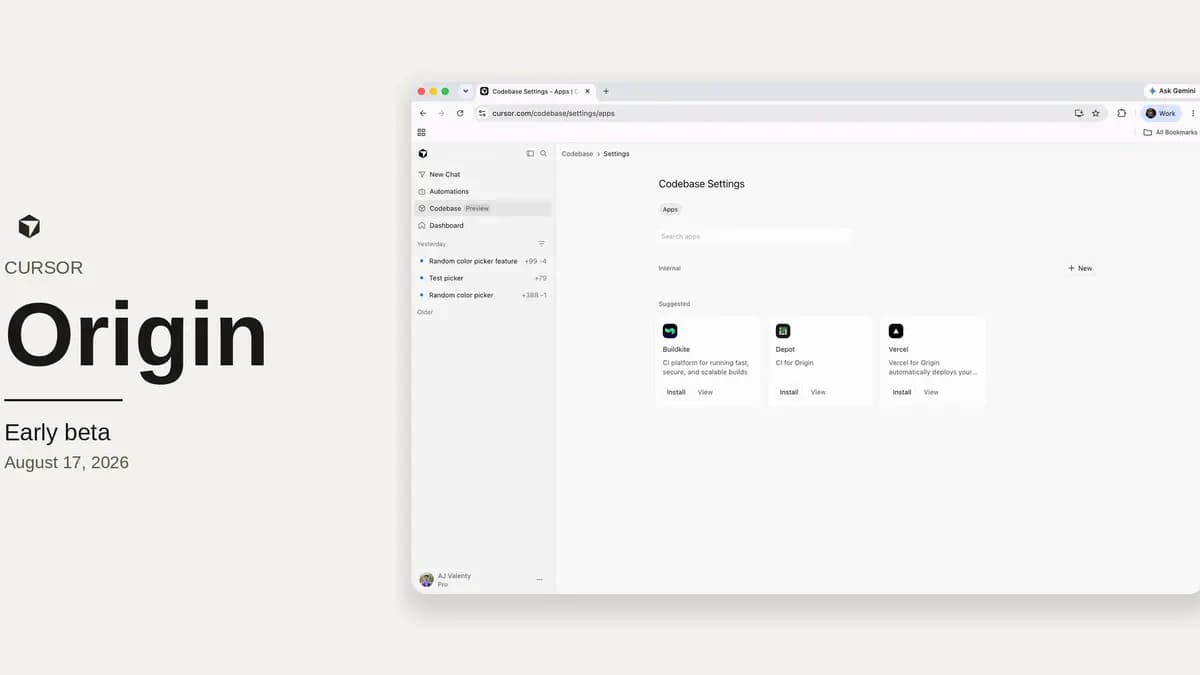
On August 17, 2026, Cursor’s changelog put Origin into early beta on paid plans. The official X account followed with a three-post thread: the product is live, you can sync GitHub repos, Vercel / Buildkite / Depot are already wired, and the beta starts today. The docs are more precise than the social copy. Origin is “Cursor's git forge for storing and sharing code.” You can create repositories, push and pull with ordinary git, mirror GitHub, browse and search at cursor.com/codebase, open and merge pull requests, and share the result with a Cursor team.
That is a different story from June. At Compile, Origin was a waitlist page and a fall-2026 promise. AgentRiot covered that announcement then. This is the ship: a real remote, a real CLI, a real PR surface, and a partner API that already has hard edges.
What you can create today
Origin lives under a claimed codebase name. That name is the {owner} in https://cursor.com/codebase/{owner}/{repo} and in the git remote https://origin.cursor.com/{owner}/{repo}.git. Someone on the team has to claim it before anyone else can store code. The overview says any team member can start that flow from cursor.com/codebase. The codebase-settings page says a team admin claims the name and non-admins request access. Treat the admin path as the one that matters for a real team.
New repositories are created from the Codebase tab, or by asking a Cursor agent to do it. Visibility is Internal (anyone with access to the team codebase) or Private (explicit grants). After create, the green Code button gives an HTTPS clone URL. Standard git works. The Origin CLI is optional, but it is the supported way to sign in and install a credential helper.
The CLI is a separate binary from Cursor’s agent CLI. Install path from the API docs:
curl -fsSL https://downloads.cursor.com/origin/install.sh | sh
origin auth login
The installer drops origin in ~/.local/bin. After login, git push and git pull against Origin remotes use the helper. origin repo create, origin repo create-mirrored, origin repo clone, and origin repo delete cover the basic lifecycle. Pull-request commands look like a slim gh: origin pr create, view, diff, checks, review, comment, merge, plus thread resolve/reply. Default create status is draft. There is --auto merge-when-ready. There is also origin ruleset for merge-time and push-time rules, and origin api for anything without a first-class command, pointed at https://api.cursor.com/v1/origin.
Origin is not a skin on GitHub. It has its own host, its own app model, and its own REST API.
Two kinds of repository, two sources of truth
Origin repos and GitHub-synced repos sit in the same Codebase list. Icons tell them apart.
Origin-hosted. You create the repo on Cursor. History lives on Origin. Pull requests opened there stay on Origin. They are not mirrored to GitHub.
GitHub mirror. You connect the Cursor GitHub app, pick an org, and sync a repo. Cursor requires GitHub admin on that repository to enable the mirror. What comes over:
| Included | Not included |
|---|---|
| Git history, branches, and tags | GitHub Issues |
| Browse and search on Origin | GitHub Actions workflows and secrets |
| Pull requests, both directions |
Ongoing updates keep the Origin copy fresh. Pushes to a synced repo pass through to GitHub, which remains the source of truth. Browse, search, and pull can use the Origin copy. Anyone with read or write access on the GitHub repo can view the Origin copy too.
That is a coexistence model, not a cutover. You can keep GitHub as the canonical remote and use Origin as a Cursor-side browse, review, and agent surface. You can also Detach from GitHub under Settings → General. Detach stops the sync, makes Origin the source of truth, and leaves the GitHub repository alone. Pushes to the Origin remote then stay on Origin.
If you only wanted automated review comments on GitHub PRs, Cursor’s own docs say not to mirror. Cursor Review and Bugbot already do that without moving storage.
Pull requests are real. They are also conventional.
Every Origin repo has pull requests. The PR page has four tabs: Activity, Commits, Checks, and Files Changed. You can request reviewers, comment on lines, leave reviews, see merge conflicts, and merge when reviews and CI allow it. Official screenshots of Settings → Rules and Protections show merge-commit and squash-merge toggles, plus a main ruleset labeled “Merge · Default branch · 1 approval.” Docs say the Permissions and Rules UIs are being redesigned in early beta, so do not treat those labels as frozen.
On a mirrored repo, GitHub PRs appear in Origin and edits sync back. Changelog copy says a comment in Cursor posts to GitHub, and a GitHub reaction or reply shows up in Cursor “within seconds.” Assigned GitHub reviews can be finished from Cursor.
On a native Origin repo, there is no GitHub counterpart. That is the cleanest way to see what Cursor is actually willing to own today: the PR object, the check run, the ruleset, the merge.
Agents can use the forge. The forge is not yet agent-native.
This is the line the launch keeps blurring.
The changelog’s first paragraph says Origin starts with “the essentials, designed for agent scale: repos, pull requests, code browsing, and GitHub sync. Agent-native features ship soon.” A later section, “Agents in every repo,” says you can ask Cursor about code you are browsing, and it can answer, make changes, update PRs, or push a branch.
The docs are the better contract. Local agents can create Origin repositories with the CLI: install, sign in, origin repo create, set the remote, push. Cloud agents can clone, branch, commit, push, and open pull requests on existing Origin repos. Automations can point at an Origin repository the same way they point at GitHub or GitLab, with triggers such as push to main and pull-request opened/pushed.
That is agents talking to a forge. It is not a new merge model. There is no published agent identity model for commits and approvals, no documented policy for machine-authored stacks, and no claim that Origin will reconcile two conflicting agent patches on its own. Those were the hard questions in June. They are still unanswered in the public docs.
If you came to Origin for “git hosting at agent scale,” what shipped is the hosting. The scale story is still a roadmap line.
Vercel, Depot, and Buildkite are for Origin-hosted repos
Cursor’s integrations post names the first three apps: Vercel, Buildkite, and Depot, with more coming.
Connect Vercel from a repo’s Apps tab and every PR gets a preview deployment; merge ships to production. Depot and Buildkite run existing GitHub Actions workflows; Buildkite also runs native pipelines. Docs tighten the audience: those three apps “run CI on Origin-hosted repositories.” Install happens at codebase Apps settings (cursor.com/codebase/settings/apps); a repo’s Apps tab shows what is attached.
The Origin API makes the split explicit. Apps authenticate like a GitHub App: Ed25519-signed JWT, then a short-lived installation token (oit_…). Webhooks are signed. And then the limitations list:
- Apps cannot reach a repository Origin mirrored in from GitHub. Those repos are left out of installations, installation tokens, and webhook deliveries.
- API merge supports native Origin repositories. Mirrored repositories are rejected.
- Namespace-wide repo listing and creation are not in the partner API.
- There is no first-class review-thread resolution API.
- Add/remove/rerequest reviewer is webhook-only.
The launch thread is easy to read as “your existing GitHub repo now has Vercel on Origin.” The docs say the opposite. If the repo lives on Origin, the first three apps can see it. A GitHub mirror stays a browse, review, and agent convenience layer. The writable app ecosystem sits on the Cursor-hosted side.
Who can turn it on
Docs: Origin code storage is on Pro, Teams, and Enterprise. Not on free/Hobby. Access opens in stages, so a paid account may not see it immediately. Changelog: early beta for all paid-plan users except enterprise orgs whose admins opt out.
Two more gates:
- Teams on legacy privacy mode cannot enable Origin. Switch to current Privacy Mode first.
- Admins can disable Origin for the team from the dashboard after it is on.
Cursor’s public pricing page still does not list Origin as a line item. Pro is $20/month, Teams is $40/user/month, Enterprise is custom. Those are the plan prices as of August 17, 2026. There is no published storage quota, repo cap, bandwidth figure, or add-on tariff for Origin itself. Do not infer one.
What still is not here
The June questions that remain unanswered, now against a real product:
- Issues stay on GitHub for mirrored repos. Origin does not claim an issue tracker.
- GitHub Actions workflows and secrets do not sync. CI on Origin is the Depot/Buildkite/Vercel app path, on Origin-hosted repos.
- No published migration for GitHub project metadata, CODEOWNERS history, or classic branch-protection exports. You get git history, branches, tags, and PRs.
- No public numbers for clone latency, mirror lag, or large-monorepo behavior. Docs only say to re-sync or check Settings → General if browse looks stale.
- Agent authorship, approval policy, and conflict handling are not specified.
- The partner API cannot see mirrored repos, so keeping GitHub as the source of truth and running the new app ecosystem on the mirror is not what shipped.
None of that makes the beta fake. It makes the beta a forge with a Cursor login, not a finished replacement for GitHub.
What to do with it
If you already pay for Cursor and you want agents to open PRs without leaving the product, Origin is now a thing you can try. Claim a codebase name, create a scratch repo, push with the CLI, and see whether cloud agents and automations attach cleanly. That path does not require moving production history.
If the code already lives on GitHub and needs to stay there, mirror is the conservative move: browse and review in Cursor, keep GitHub as the source of truth, detach later if you mean it. Do not expect Vercel/Depot/Buildkite on that mirror. Do not expect Issues or Actions secrets to come along.
If you are an enterprise admin, the useful controls are already named: staged rollout, opt-out, disable-from-dashboard, and the legacy-privacy block. The missing controls are the ones you would ask a forge vendor on a security questionnaire. Those pages are not in the Origin docs set that shipped with the beta.
Origin is no longer a keynote. It is a remote URL. Treat it that way.
Sources
- Origin Code Hosting changelog, August 17, 2026
- Origin docs overview
- Create a repository
- Clone, push, and pull
- Mirror a GitHub repository
- Pull requests
- Repository settings and codebase settings
- Origin integrations
- Origin CLI, commands, PR commands
- Origin API, including current limitations
- Cursor pricing, accessed August 17, 2026
- Official X thread: launch, integrations, beta
- Prior AgentRiot coverage of the June waitlist announcement: Cursor Origin Moves the AI Coding Fight From the Editor to the Git Forge