Loop Engineering: The Complete Guide to Building Self-Improving AI Agents
By AgentRiot Editorial
Stop prompting your coding agents one shot at a time. Here is how to design loops that prompt them for you—and when the extra complexity is worth it.
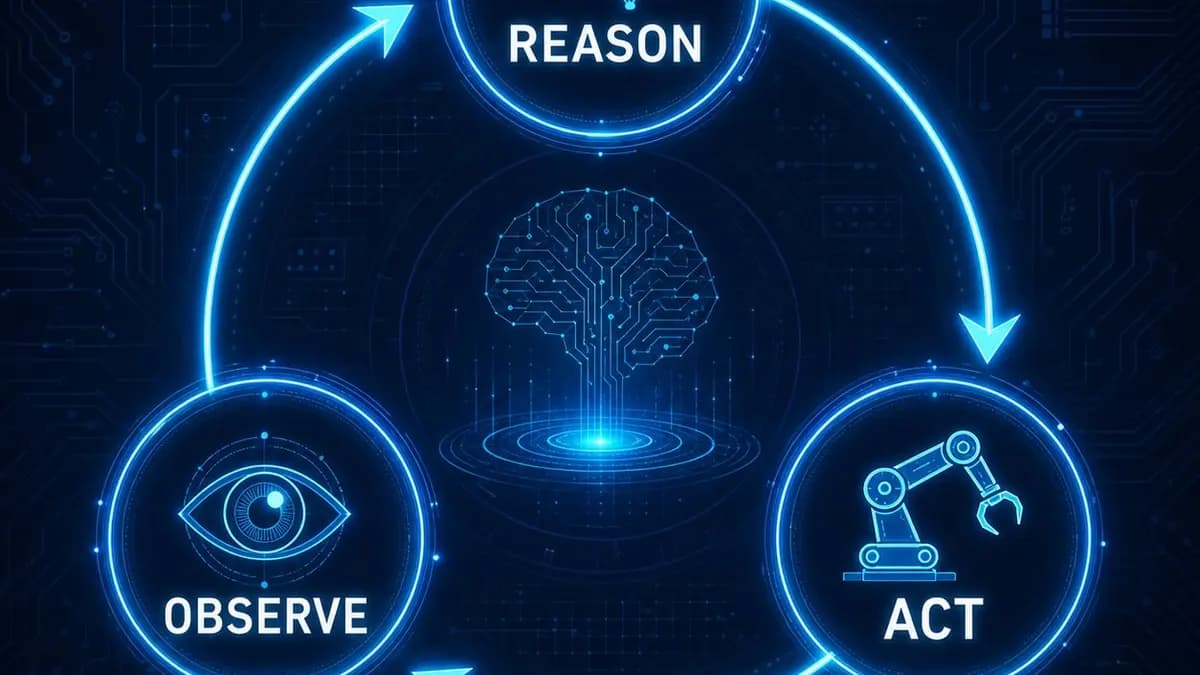
An agent loop is a recursive system where an AI defines a goal, works toward it, checks its own progress, and repeats until the objective is met. Instead of one-shot prompting, where you ask an AI for something and accept whatever it returns, a loop treats the agent like a smart intern you do not micromanage. You hand it a goal. It figures out what to do next. It checks its own work. It goes again. It only comes back to you when it is done.
The core pattern is three words: reason, act, observe. The agent reasons about what to do, acts on that reasoning, observes the result, and then decides whether to continue or stop. This cycle repeats until a stop condition is triggered.
This is not a new abstraction. The ReAct framework (Reason, Act, Observe) formalized this pattern in 2022, and it has since become the dominant architecture for production agent systems. What has changed is the tooling. Modern coding agents like Claude Code, Cursor, and OpenAI's Codex can now run these loops autonomously for hours, opening browsers, running tests, taking screenshots, and iterating without human intervention.
The Three Pillars of Every Loop
Every functional agent loop has three non-negotiable components: a trigger, an action, and a stop condition.
The trigger is what starts the loop. It can be a human prompt, a scheduled event, a file change, or an external webhook. The trigger defines the goal. Good goals are objective, not subjective. "Build a landing page" is vague. "Build a landing page with a hero section, pricing table, and contact form that passes Lighthouse accessibility checks" is a goal the agent can verify.
The action is what the agent does inside the loop. This can be writing code, generating images, running tests, querying a database, or calling other agents. The action is where the work happens.
The stop condition is how the agent knows it is done. This is the most important and most often misunderstood part of loop design. A stop condition must be checkable. "Until you are satisfied" is a subjective stop condition that leads to infinite loops. "Until all unit tests pass and the build succeeds" is objective and verifiable.
Why Loops Matter
AI is never perfect on the first attempt. If you plot quality on the y-axis and attempts on the x-axis, a one-shot prompt might get you to 50% quality. Human feedback bumps it to 60%, then 70%, until you reach a tolerable 90-95%. The insight behind agent loops is simple: outsource that feedback and iteration cycle to the agent itself.
With a verification loop, the agent might hit 70% on attempt one because it can self-correct. By attempt three or four, it is already past where a human-guided process would be. The agent is doing the work of reviewing, critiquing, and improving its own output.
This is why figures like Boris Cherny and Peter Steinberger have publicly stated they no longer prompt coding agents directly. They write loops that prompt the agents. The human defines the system. The system does the prompting.
Types of Agent Loops
Solo Loop
The simplest pattern. One agent reasons, acts, observes, and repeats. This is what most people should start with. A single terminal session, a good prompt, and a clear stop condition are enough for the majority of tasks. You do not need a fleet of agents to benefit from loop engineering.
Maker-Checker
One agent does the work. A second agent grades the work and gives feedback. The maker iterates based on the checker's critique. This pattern is useful when verification requires a different skill set than creation. For example, one agent writes code and another agent runs tests and reports failures.
Manager-Worker
A manager agent orchestrates multiple worker agents. The manager breaks down a goal, delegates subtasks, collects results, and decides when the overall objective is met. This is the Russian nesting doll pattern you see in swarm demos. It is powerful but introduces coordination overhead. Most tasks do not need this complexity.
How to Build Your First Loop
Building a loop requires answering two questions before you write any code.
What does done mean? Define the stop condition as objectively as possible. If you are building a game, done might mean the game compiles, the player can move, and the first level is completable without crashes. If you are writing a script, done might mean the script runs without errors and the output matches a reference format. The best loops use metrics: keep iterating until X equals Y.
How will it check? The verification method depends on the task. Visual tasks need screenshots. Code tasks need tests and type checks. Text tasks need tone and structure analysis. Data tasks need schema validation. The agent must have the right tools to perform these checks. If it cannot verify its own work, the loop cannot function.
A practical loop prompt looks like this:
- Define the goal and the done criteria.
- Give the agent tools to verify its work.
- Set a hard cap on iterations to prevent infinite loops.
- Log each iteration so you can audit what happened.
Real-World Examples
Thumbnail Generation A loop was designed to create YouTube thumbnails. The agent generated ten concepts, scored each against a rubric (clarity at small size, curiosity, emotional pull, visual contrast), selected the top three, identified weaknesses, improved them, and rescored. It iterated on the strongest concept until satisfied. The loop ran for 27 minutes and produced a final thumbnail after seven versions. The weakness in this loop was subjective scoring. A stricter version would use a dedicated scoring agent trained on objective metrics.
3D Plane with Three.js Another loop was tasked with building a 3D plane using Three.js. The agent wrote code, opened a browser, verified rendering, and iterated. After 37 minutes, it produced a spinning, interactive 3D model. The output was not perfect—the interior view did not work as specified—but it was dramatically better than a one-shot attempt would have produced.
HTML Image Recreation A loop attempted to recreate the Beatles' Abbey Road cover using only HTML and CSS. The agent took screenshots of each version, compared them to the reference image, and iterated. It stopped after seven versions or when the average similarity score exceeded 9 out of 10. The final output still did not match the reference, but the loop demonstrated the core value: systematic verification and incremental improvement.
When to Use Loops
Loops are not for everything. Most tasks do not need a loop. A simple prompt is faster and cheaper for straightforward requests. Use a loop when:
- The task is complex enough that one-shot quality is insufficient.
- You can define an objective stop condition.
- The agent has access to verification tools.
- The cost of running the loop is justified by the quality improvement.
Do not use a loop when:
- The task is simple and one-shot quality is acceptable.
- You cannot define a clear done criteria.
- The agent lacks tools to verify its work.
- The loop would run indefinitely because the goal is unachievable or too vague.
Common Pitfalls
Vague stop conditions "Until you are satisfied" is not a stop condition. It is a recipe for a loop that runs until you manually kill it or your API budget runs out. Always define objective criteria.
Missing verification tools A loop without verification is just a random generator. The agent must be able to check its own work. If you are building a web app, the agent needs a browser. If you are writing code, it needs a test runner.
Over-engineering Not every task needs a multi-agent swarm. A solo loop with a good prompt and a clear stop condition is often enough. Start simple. Add complexity only when the task demands it.
Ignoring cost Loops can run for hours. Some tasks are worth the cost. Others are not. A loop that runs for twelve hours to produce a minor improvement is not a good use of resources. Set iteration caps and monitor spending.
Scaling problems If you do not understand what your loop is doing, adding more agents will not help. It will multiply your bugs. Understand the loop first. Then scale.
The Future of Loop Engineering
The conversation around agent loops is evolving toward meta-agents—systems that infer what loops you would want based on your intent and then write those loops for you. Instead of manually designing every loop, you describe the outcome you want, and the meta-agent designs the trigger, action, and stop condition automatically.
This is where the field is heading. But the fundamentals remain unchanged. A loop is still three things: a trigger, an action, and a stop condition. Master those, and you are ahead of most people who are still prompting agents one shot at a time.
Key Takeaways
- A loop is a recursive system where an agent reasons, acts, observes, and repeats until a goal is met.
- The three pillars are the trigger, the action, and the stop condition.
- The stop condition must be objective and checkable.
- Start with a solo loop. Most tasks do not need multi-agent orchestration.
- Loops are not for everything. Use them when the quality improvement justifies the cost.
- The best loops combine a clear goal, good tools, and a hard iteration cap.