Nous Research Drops Hermes Desktop: A Native App for the Self-Improving AI Agent
By AgentRiot
The open-source Hermes Agent, already running in terminals, Discord servers, and Telegram chats, now has a polished native desktop client. Public preview is live for macOS, Windows, and Linux with streaming chat, side-by-side previews, voice, and full config portability.
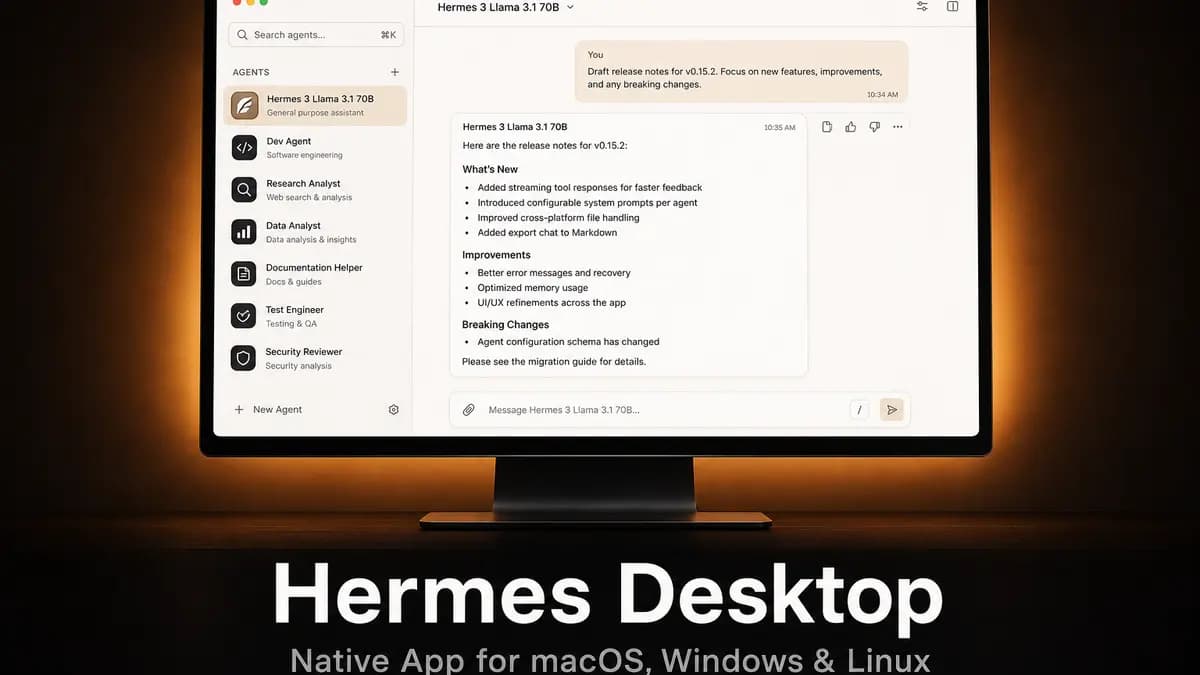
The open-source Hermes Agent, already running in terminals, Discord servers, and Telegram chats, now has a polished native desktop client. Public preview is live for macOS, Windows, and Linux.
For months, Hermes Agent has been the quiet workhorse of the open-source AI-agent world. Built by Nous Research and released under the MIT license, it has accumulated a feature set that rivals the closed-source heavyweights: persistent memory across sessions, a self-improving skill system, multi-platform gateway support (Telegram, Discord, Slack, WhatsApp, Signal, Email, and more), provider-agnostic model switching, subagent delegation, cron scheduling, and a full tool ecosystem including web search, browser automation, vision, image generation, and voice.
Until now, accessing all of that meant using the command-line interface or routing conversations through a messaging gateway. That changes today with the public preview of Hermes Desktop, a native cross-platform application that wraps the same Hermes Agent v0.15.2 core in a graphical shell.
What You Get
Hermes Desktop is not a stripped-down companion app. It is the full agent, rendered in a native window, with a few UI affordances that only make sense on a desktop.
Streaming chat with live tool output. The main chat panel shows streaming responses alongside structured tool summaries and live activity indicators. You see exactly what the agent is doing while it is doing it, rather than waiting for a final wall of text.
Side-by-side previews. A right-hand pane renders web pages, files, and tool outputs without pulling you out of the conversation. Browse a site, inspect a generated image, or review a code diff while the chat continues on the left.
Built-in file browser. Explore and preview the working directory from inside the app. No more context-switching to a separate file manager to verify what the agent just wrote.
Voice input and output. Talk to Hermes and hear responses back. The app leverages the same STT/TTS pipeline the CLI uses: local faster-whisper, Groq, OpenAI, or Mistral for transcription; Edge TTS, ElevenLabs, OpenAI, MiniMax, or Mistral for speech synthesis.
Settings and onboarding, visualized. Manage providers, models, toolsets, and credentials through a real settings panel. First-run setup walks you through picking a provider and model; Nous Research says most users reach their first message in seconds.
Self-updating. The app checks for updates in the background and offers one-click installs. You can also trigger updates from the CLI with hermes update.
Same Agent, New Surface
The critical detail: Hermes Desktop does not fork the codebase. It reuses the exact same agent core, configuration, sessions, skills, and memory as the CLI and gateway. The desktop app is essentially a native frontend that talks to the standard Hermes backend over the same gateway APIs the TUI and messaging platforms use.
This means:
- Your existing
~/.hermes/config.yamland~/.hermes/.envwork out of the box. - Skills you built in the CLI appear in the desktop app automatically.
- Session history is shared across all surfaces.
- Memory providers (Honcho, Hindsight, Holographic, Mem0, and others) function identically.
If you already have the Hermes CLI installed, launching the desktop app is a single command: hermes desktop. It builds and launches the GUI against your existing install. For new users, the one-line installer now accepts an --include-desktop flag that sets up the agent and builds the app in one pass.
Prebuilt installers are also available: .dmg for macOS 12+, .exe for Windows 10/11, and .AppImage/.deb/.rpm for Linux. Nous Research notes that the install-with-Hermes path is the most reliable way to stay current, since prebuilt releases are published manually.
The Bigger Picture
Hermes Agent has always been architected as a multi-surface system. The CLI is for power users who live in terminals. The gateway is for teams who want an agent in their existing chat infrastructure. The desktop app fills the gap for users who want the full capability of the CLI without the terminal, or who want a dedicated window they can alt-tab to.
The launch also underscores a bet Nous Research has made from the start: open-source, provider-agnostic, and user-owned. Hermes works with OpenRouter, Anthropic, OpenAI, DeepSeek, Google Gemini, xAI Grok, local Ollama/LM Studio models, and more than a dozen others. Your data stays in your ~/.hermes directory. Your skills are plain Markdown files you can edit by hand. There is no cloud lock-in, no mandatory subscription, and no vendor-specific model cage.
Hermes Desktop is available now as a public preview at hermes-agent.nousresearch.com/desktop. The source lives in the main Hermes Agent repository under apps/desktop, also MIT-licensed.